Add-ons cost you the sale when the buyer has to make too many decisions before they can say yes. Every extra option adds a question, an approval, and a place to ask for a discount. The fix is to sort your price book: bundle what most buyers need into a tier, keep a short list of fixed-price add-ons a few buyers will pay for, and kill the rest. Then offer add-ons only after the main sale is made.
Key Takeaways:
- Each add-on on the quote is one more decision the buyer has to make before they can sign.
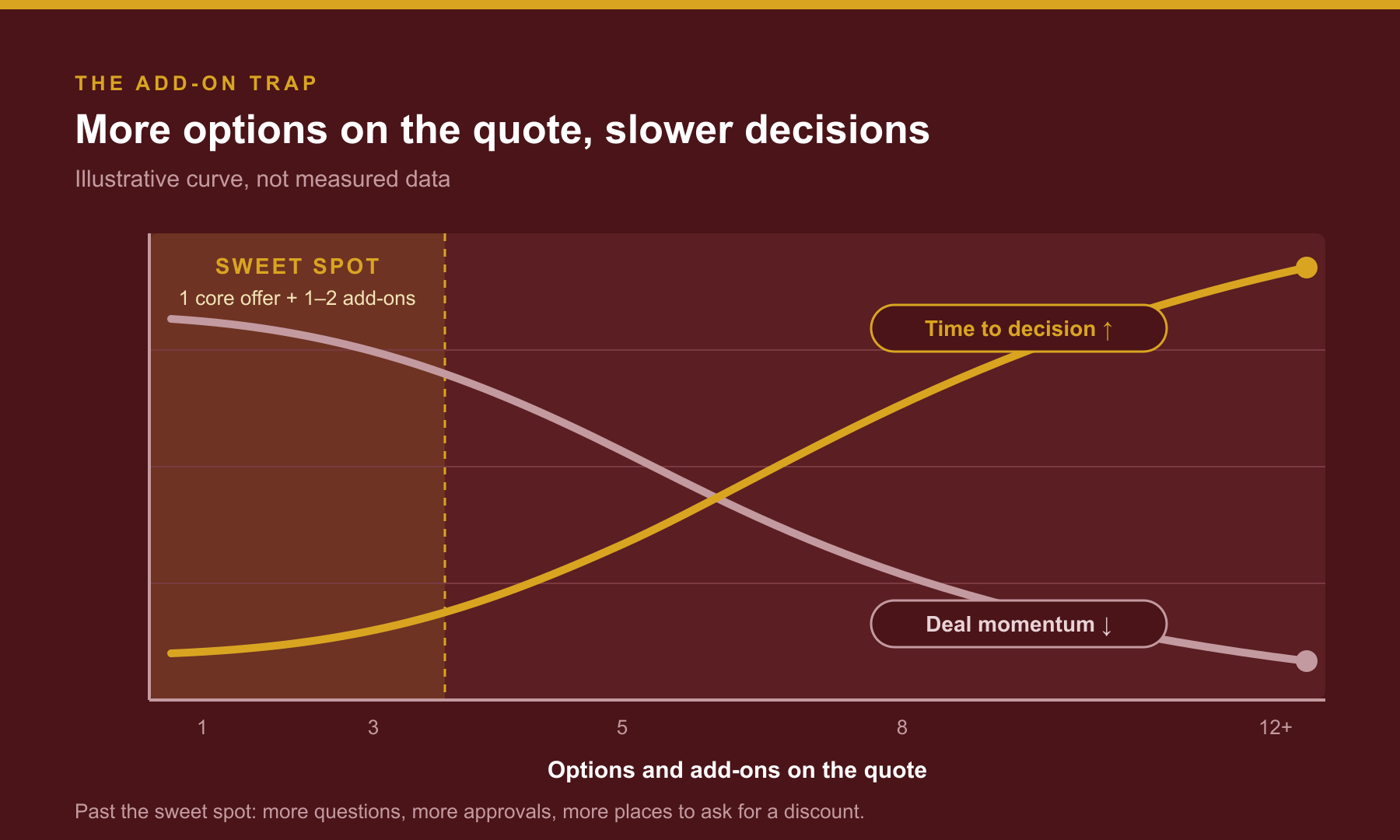
- A big menu gets attention. A short menu gets the purchase. In the classic jam study, 30% bought from 6 choices vs. 3% from 24 (Iyengar & Lepper, 2000).
- Add-ons that show up in almost every deal belong inside a tier, not on a separate line.
- Add-ons that are rarely sold, mostly given away, or hard to explain should come off the price book.
- Sell the main product first. Offer one add-on after the buyer has said yes in their head.
- Run the triage on your last 20 closed deals. Count what happened. Don't guess.
Here's how it usually starts. A customer asks for something extra. You build it. You give it a price. Now it's an add-on.
Then another customer asks for something else. Another add-on. A year later your quote has a base price and nine optional lines. Onboarding. Premium support. An integration pack. Extra reports. A training day. Each one made sense when you added it.
But look at what it does to a deal. The buyer liked your product on the first call. Now they're staring at a menu. They don't know which lines they need. Their boss asks why there are so many. Their finance person asks which ones can come off. Your rep can't answer without calling you.
The deal didn't die because your price was too high. It died because you asked the buyer to make ten decisions when they came to make one.
“Every add-on feels like extra revenue. Stack too many and you've built a menu the buyer has to study instead of a decision they can make.”
Why do too many add-ons slow down B2B deals?
Too many add-ons slow deals because each one is a decision, and decisions slow buyers down. The buyer has to figure out what they need, defend each line to people you'll never meet, and decide what to cut. A short, clear offer moves faster because there's less to argue about.
A big menu draws a crowd. A short one closes the sale.
The best-known research on this is the jam study. Shoppers in a grocery store saw either 24 jams or 6 jams on a tasting table. The big display drew more people. 60% stopped, compared with 40% at the small one. But nearly 30% of the people who saw 6 jams bought a jar. Only 3% of the people who saw 24 did (Iyengar & Lepper, 2000).
I'll be straight with you. That was jam, not software. Later research found choice overload doesn't happen every time. It shows up most when the choices are complex and the buyer isn't sure what they want (Chernev, Böckenholt & Goodman, 2015).
Read that again, because it describes a B2B quote. Your options are complex. And most buyers don't know yet which integration pack or support level they'll need. That's exactly when a long menu hurts you the most.
Your champion has to defend every line
Your contact doesn't buy alone. Gartner found buying groups run from five to 16 people across as many as four functions (Gartner, 2025). Every add-on is something your champion has to explain in a meeting you won't attend.
"Do we need premium support?" "What's the training day for?" "Can we skip onboarding and do it ourselves?" Each question gives the group a reason to wait. And when a group can't agree, the easiest answer is to do nothing.
Every line is a place to negotiate
A quote with nine optional lines gives the buyer nine places to push. "Throw in the training day and we'll sign." Your rep wants the deal, so they call you. You give it away. Now that add-on is free in every deal that hears about it.
This is how add-ons quietly turn into discounts. I covered what that does to your margin in The Discount Trap.
“Your buyer came to make one decision. Don't hand them ten.”
How do I know if I have too many add-ons?
You have too many add-ons if your reps can't explain them without you, if most deals include the same "optional" items anyway, or if add-ons get given away to close. Pull your last 20 closed deals and look at the add-on lines. The pattern will tell you more than any pricing theory.
Here are the warning signs I look for:
- The same add-on is in almost every deal. If nearly everyone buys it, it isn't optional. It's part of the product with a separate price tag.
- Add-ons get thrown in to close. If your reps give an add-on away more often than they sell it, it's a discount in disguise.
- Your rep's most common question is "which ones should I include?" If the rep doesn't know, the buyer won't either.
- Customers skip an add-on and then struggle. If buyers who skip it end up unhappy, it was never really optional.
- Nobody remembers why an add-on exists. It was built for one customer three years ago. Two people have bought it since.
How do I clean up my price book?
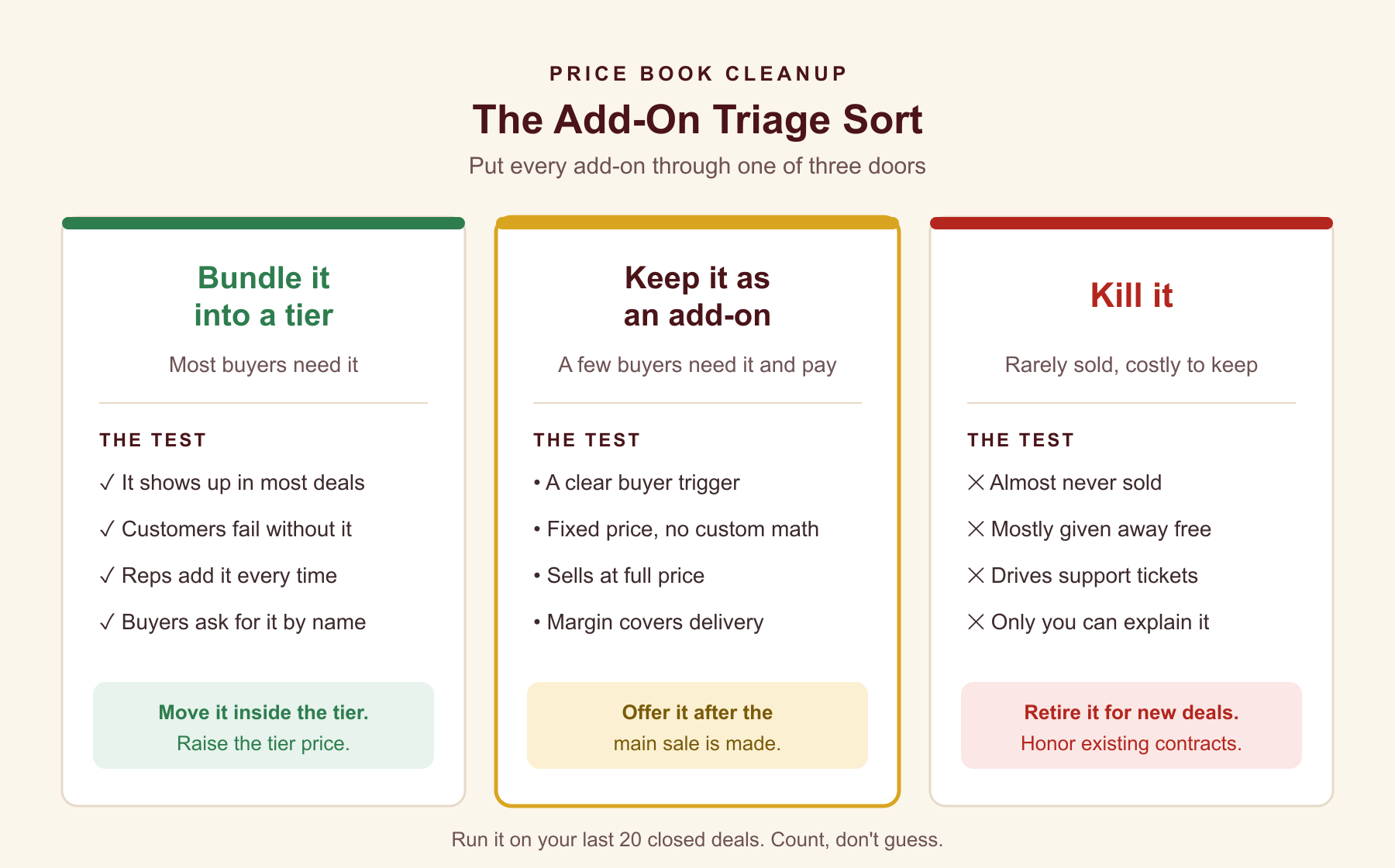
Clean up your price book by putting every add-on through one of three doors. Bundle it into a tier if most buyers need it. Keep it as an add-on if a few buyers need it and will pay full price. Kill it if it's rarely sold, mostly given away, or costs you more in support than it brings in.
Door 1: Bundle it into a tier
If an add-on shows up in most deals, move it inside a tier and raise the tier price to cover it. The buyer gets one number instead of two. Your rep stops asking "do you want onboarding?" and starts saying "onboarding is included."
Pay close attention to the add-ons customers need to succeed. Years ago I sold a software product with a complex installation. We proposed professional services to install and configure it. A large customer bought the software and skipped the services to save money. They ran into problems our team would have solved quickly.
That's the lesson. If skipping an add-on puts the customer's success at risk, it shouldn't be optional. Build it into the tier. I walked through how to design the tiers themselves in Good-Better-Best packaging.
Door 2: Keep it as an add-on
Some add-ons earn their spot. A few buyers need them, those buyers have a clear reason, and they'll pay full price. Keep those. But give each one four things:
- A trigger. The buyer situation that makes it a fit, like "more than three locations" or "needs a custom integration."
- A fixed price. No custom math. Your rep should be able to say it out loud.
- A margin check. The price covers what it costs you to deliver.
- A rule against giving it away. If it's free whenever someone pushes, it's not an add-on. It's a discount.
Keep this list short. If your rep needs a cheat sheet to remember the add-ons, you have too many.
Door 3: Kill it
This is the hard one for founders. Every add-on was somebody's idea, and some of them were yours. But an add-on that almost never sells still costs you. It clutters the quote. It confuses the rep. It creates support tickets. And it gives buyers one more thing to ask for free.
Retire it for new deals. Honor it for existing customers until renewal. Then let it go.
Run the sort on real deals
Don't do this from memory. Pull your last 20 closed deals and your last 20 lost deals. For each add-on, count three things: how often it was quoted, how often it was sold at full price, and how often it was given away. If it isn't in the CRM, it never happened, so this is also a good test of how clean your deal records are.
“If almost every buyer needs it, it isn't an add-on. It's part of the product with a separate price tag.”
Related ReadingIf Your Pricing Needs a Spreadsheet, You've Already Lost the Deal →
When should my rep offer an add-on?
Your rep should offer an add-on after the buyer has committed to the main purchase, not before. Lead with one clear recommendation for the core product. Once the buyer has said yes in their head, offer the one add-on that fits their situation, with a reason tied to their goal.
I learned this when I was 10 years old. It was the summer of 1962, and I worked at a hot dog stand. When a customer ordered just a hot dog, I asked, "You want fries with that?" Most people said yes.
Notice what I didn't do. I didn't hand them a menu of six sides before they ordered. I sold the hot dog first. Then I offered one thing that went with it.
That still works. Once the buyer is committed, your rep can say something like:
"Most of our customers with more than three locations also add the multi-site reporting pack, so each manager sees their own numbers. Can we add that to your order?"
One add-on. One reason. One question. If the answer is no, the main deal is still done.
Write the add-on rules in the playbook
Put the rules where your reps can find them. Which add-ons exist, who they're for, what they cost, and the one line to offer each one. Then role-play it in your sales meeting. A rule your reps haven't practiced is a rule that comes back to your desk.
How does a simpler offer help me get out of founder-led sales?
A simpler offer gets you out of founder-led sales because reps can sell it without you. When the price book has a few clear tiers and a short list of add-ons with rules, your reps can quote, recommend, and close on their own. Every judgment call you remove from the quote is one less reason a deal needs you.
It also helps buyers feel sure of their choice. Gartner found that B2B customers who feel confident in their purchase decision are 2.6 times more likely to buy more from the supplier later (Gartner, 2019). A buyer who understood what they bought is easier to expand than one who's still wondering if they picked the right lines.
And it helps you keep good reps. Salespeople don't quit companies. They quit chaos. A price book only the founder understands is chaos with a dollar sign on it.
After 50 years in sales, including 22 years building MindIQ into an INC 500 company, I've seen this pattern over and over. The offers that scale are the ones a new rep can explain on their second week.
Frequently Asked Questions
Q: How many add-ons is too many?
There's no magic number, but if your reps can't name every add-on and who it's for without a cheat sheet, you have too many. Most founders I work with land on three tiers and two to four add-ons. The test is whether a rep can recommend the right combination on the call.
Q: Won't bundling add-ons into tiers lower my revenue?
Not if you raise the tier price to cover what you moved in. You're also likely to stop giving those add-ons away to close deals. Check your last 20 deals. If an add-on was free in half of them, bundling it at a price may bring in more than selling it separately ever did.
Q: What's the difference between an add-on and an upsell?
An add-on is a separate item on the price book that a buyer can include with the main purchase. An upsell is the act of moving a buyer to more, either a higher tier or an add-on. A clean price book makes upselling easier because your rep has one clear next step to offer.
Q: Should I show add-on prices on the first call?
Give the core price on the first call. Mention that add-ons exist for specific situations, but don't walk through the list until you know the buyer's needs. Then recommend only the add-on that fits. Leading with the full menu turns discovery into a pricing debate.
Q: What do I do with existing customers who bought an add-on I'm killing?
Honor what they bought until renewal. At renewal, either fold it into their tier or give them notice that it's being retired, with plenty of time to plan. Don't change a contract mid-term. I covered the sequence for changing what customers pay in How to Raise Prices Without Losing the Customers You Have.
Q: Can a Fractional Sales Leader help clean up a price book?
Yes. A Fractional Sales Leader looks at your deal data, sorts your add-ons, writes the rules into your Sales Playbook, and trains your reps to use them. The goal is a price book your team can sell without pulling you into every quote.
Turn your price book into something your team can sell.
If you're at $1M to $10M ARR and every quote still needs you to pick the add-ons, let's sort the price book and write the rules your reps can follow. Learn about Fractional Sales Leadership at LouieBernstein.com.
Schedule a 30-Minute CallAbout the Author
Louie Bernstein
Louie Bernstein is a Fractional Sales Leader and the founder of MindIQ. He helps B2B founders build repeatable sales systems through Sales Playbooks, clear sales processes, pipeline management, and coaching.